
Its returns the inverse of a square matrix if it exists (i.e., the matrix is non-singular).
Syntax
MINVERSE(array)
Argument
| Parameter | Requirement | Valid Input |
| array | Required | Square numeric array (e.g., 2×2, 3×3) |
Key Properties
- Prerequisites:
- Matrix must be square (equal rows/columns).
- Determinant ≠ 0 (check with MDETERM()).
- Rejects:
- Non-numeric/text → #VALUE!
- Non-square arrays → #VALUE!
- Singular matrices → #NUM!
- Mathematical Definition:
For matrix A, its inverse A⁻¹ satisfies:

-
- Calculated via LU decomposition in Excel (16-digit precision).
- Critical Notes:
- Array Formula: Must be entered with Ctrl+Shift+Enter (legacy Excel) or Enter (dynamic arrays in Excel 365).
- Numerical Stability: Rounding errors may occur for ill-conditioned matrices.
Example
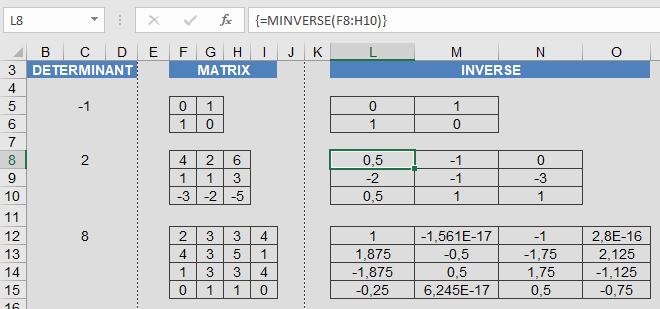
Why This Matters
- Engineering: Circuit analysis, structural modeling.
- Economics: Input-output models (Leontief).
- Computer Science: 3D transformations, cryptography.
Error Handling
| Error | Cause | Solution |
| #VALUE! | Non-square/non-numeric input | Validate matrix dimensions/contents |
| #NUM! | Singular matrix (det=0) | Use pseudoinverse or reformulate problem |