
Its extracts the month number (1-12) from a date, where:
- 1 = January
- 12 = December
Syntax
MONTH(serial_number)
Arguments
- serial_number (required):
- A valid date
- Can be:
- A date string (e.g., « 11/14/1959 »)
- A serial number (Excel date format)
- A cell reference containing a date
- The result of another function (e.g., TODAY())
Background
Part of Excel’s date function family (with YEAR() and DAY()). Used to:
- Extract months for grouping/sorting data
- Support monthly reporting
- Enable date-based calculations
Examples
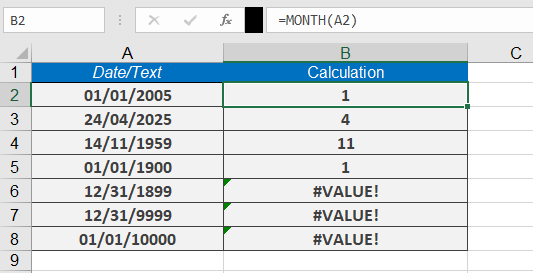
Assume that you want to enable the Excel AutoFilter for the months and need to calculate the month values from a date column by using an auxiliary column. To do this, use the formula
=MONTH(date_value)
Here are more examples:
| Formula | Returns | Explanation |
| =MONTH(TODAY()) | 9 (if current month is September) | Current month number |
| =MONTH(« 11/14/1959 ») | 11 | November extraction |
| =MONTH(« 01/01/1900 ») | 1 | January extraction |
| =MONTH(« 12/31/1899 ») | #VALUE! | Invalid date (pre-1900 in Windows) |
| =MONTH(« 12/31/9999 ») | #VALUE! | Invalid |
| =MONTH(« 01/01/10000 ») | #VALUE! | Invalid date (post-9999) |
Notes
- Returns #VALUE! for:
- Text-formatted dates
- Dates outside Excel’s valid range (1/1/1900–12/31/9999 for Windows)
- Combine with YEAR() and DAY() for complete date analysis