
Its rounds a number to the nearest specified multiple, using standard rounding rules (up if remainder ≥ half of multiple).
Syntax
MROUND(number; multiple)
Arguments
| Parameter | Requirement | Valid Input |
| number | Required | Numeric value to round |
| multiple | Required | Positive numeric value (rounding interval) |
Key Properties
- Rounding Rules:
- Round Up if remainder ≥ multiple/2
- Round Down if remainder < multiple/2
- Follows banker’s rounding (toward nearest even for exact halves).
- Error Handling:
- #NUM! if number and multiple have opposite signs.
- Special Cases:
- If multiple = 0, returns 0.
- If number = 0, returns 0 regardless of multiple.
Examples
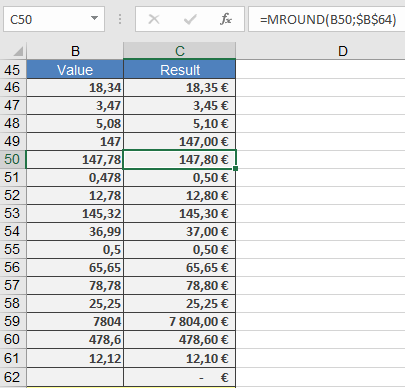
Comparison with Other Rounding Functions
| Function | Behavior | Example (number=3.25, multiple=0.5) |
| MROUND() | Nearest multiple | 3.5 |
| CEILING() | Always up | 3.5 |
| FLOOR() | Always down | 3.0 |
| ROUND() | Nearest digit | 3.2 (if rounding to 1 decimal) |
Applications
- Pricing Strategies: Ensure prices end in 0.99 or 0.49.
- Manufacturing: Round measurements to standard units (e.g., 1/8″).
- Scheduling: Align timestamps to 5/10/15-minute blocks.
Error Handling
| Error | Cause | Solution |
| #NUM! | number and multiple have opposite signs | Use same signs |
| #VALUE! | Non-numeric input | Validate data |