
This function calculates the nominal interest rate that (mathematically, in finance) results in equivalence to a given effective interest rate.
Syntax:
NOMINAL(Effect_Rate; Periods)
Arguments:
- Effect_Rate (required) – The given effective annual interest rate, derived from the compound interest of an intra-annual yield.
- Periods (required) – The number of interest periods per year.
- If the Periods argument contains decimal places, it is truncated to an integer.
- The result must be greater than zero. Otherwise, NOMINAL() returns the #NUMBER! error.
- If either argument is not a numeric expression or if Effect_Rate is not positive, NOMINAL() also returns the #NUMBER! error.
Background:
For various financial transactions (such as mortgage loans, savings accounts, interest on checking accounts, current accounts, and overdraft credits), an annual interest rate is specified but is primarily used for defining further terms. This means interest is paid in intra-annual periods rather than annually. The applied interest rate is determined by dividing the nominal interest rate by the number of periods.
To enable comparisons between different terms, the interest rate that yields the same result as intra-annual compounding with a single annual payment is called the effective annual interest rate. The following relationship exists between the two rates:
Effective Rate=(1+Nominal RatePeriods)Periods−1Effective Rate=(1+PeriodsNominal Rate)Periods−1

The NOMINAL() function solves this equation for the nominal interest rate.
Examples:
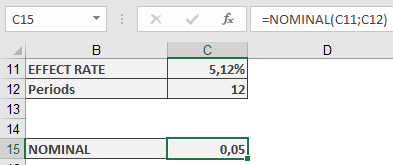
The following examples demonstrate the use of the NOMINAL() function.
Correlation:
The relationship between nominal and effective interest rates is illustrated in the examples for the EFFECT() function.
ISMA Price and ISMA Yield:
In the semi-annual interest payment example for the PRICE() function, the example includes a reconstruction of the ISMA price using Excel’s built-in function. The yield must be converted using NOMINAL().