
This function returns the z-value (quantile) of the standard normal distribution (mean = 0, standard deviation = 1) for a given cumulative probability.
Syntax:
NORM.S.INV(probability)
Arguments:
- probability (required) – A cumulative probability (0 < p < 1) associated with the standard normal distribution.
Background:
- The NORM.S.INV() function is the inverse of NORM.S.DIST().
- It calculates the z-value (standardized score) corresponding to a given cumulative probability (area under the curve to the left of *z*).
- The standard normal distribution has:
- Mean (μ) = 0
- Standard deviation (σ) = 1
Example:
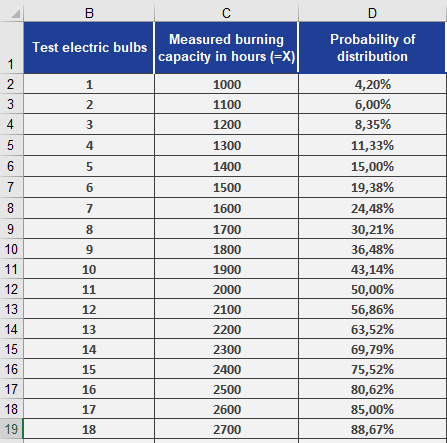
Using the light bulb lifespan data from previous examples (STANDARDIZE() and NORM.S.DIST()):
- You have already calculated probabilities for performance values (see Figure below).
- To find the z-values for these probabilities:
=NORM.S.INV(D2) // Returns z-value for the probability in cell D2
Results (see Figure below):
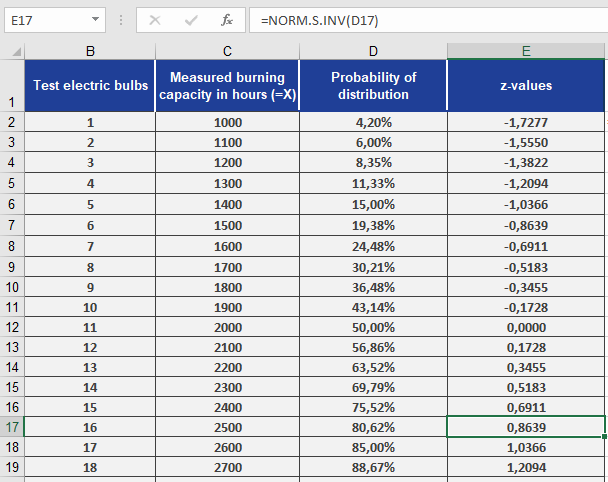
- The function converts probabilities (e.g., 0.042) back to their standard normal distributed z-values (e.g., –1.728).
- Interpretation: A probability of 4.2% corresponds to z = –1.728, meaning 4.2% of bulbs fall below this standardized lifespan.
Key Notes:
- Inverse Function: Maps probabilities back to z-scores, unlike NORM.S.DIST() (which maps z-scores to probabilities).
- Standard Normal Only: Assumes μ = 0 and σ = 1 (use NORM.INV() for non-standard distributions).