
The NPV function is used to calculate the net present value of an investment by utilizing a discount rate and a series of future cash flows. It helps determine the profitability of an investment by considering the time value of money.
The NPV function uses the following syntax for its calculations:
=NPV(rate, value1, [value2], …)
- Rate (Required Argument): This is the discount rate applied over the length of a period.
- Value1 (Required Argument): This represents the first value in a series of cash flows, which can include both payments (negative values) and income (positive values). Negative values indicate outgoing payments, while positive values indicate incoming payments.
- Value2 (Optional Argument): This represents additional values in the series of cash flows, following the same rules as Value1.
USING THE NPV FUNCTION
Using the table below, let’s calculate the net present value with the NPV function:
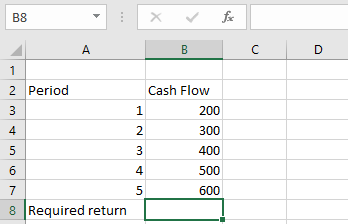
To calculate the net present value;
- Select an empty cell and enter the function with its arguments:
=NPV(B9; B3:B8)
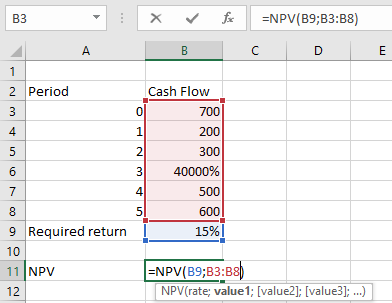
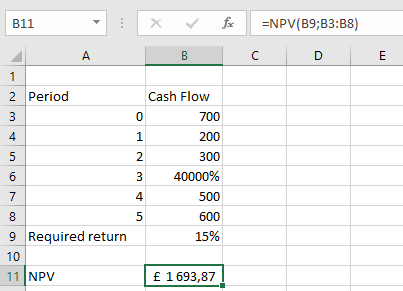
- Press Enter, and the net present value will be calculated. In this example, the net present value is £1 693,87, as shown in the table below.
IMPORTANT NOTES WHEN USING THE NPV FUNCTION
- All arguments must be numerical or functions that return numerical values. Any other form of input will result in an error.
- In the NPV function, only arrays containing numerical values are evaluated. All other values are ignored.
- The order of cash flow inputs is important and must be entered correctly.
- The NPV function assumes that payments are evenly spaced and occur at regular intervals.
- The NPV function is closely related to the IRR (Internal Rate of Return) function, as both are used to evaluate the profitability of investments.