
The OR function is a logical function that returns TRUE if any of the specified conditions are TRUE, and returns FALSE only if all conditions are false. Unlike the AND function, which requires all conditions to be true, the OR function only needs one true condition to return TRUE.
The syntax for the OR function is as follows:
=OR(logical1; [logical2]; …)
- logical1 (Required): The first condition or logical value to evaluate.
- logical2 (Optional): The second condition or logical value to evaluate.
USING THE OR FUNCTION
Let’s determine whether:
- Cell A2 is greater than 30,
- Cell B2 is less than 50,
- Cell B3 is equal to 45,
by using the OR function to return either TRUE or FALSE based on the evaluation.
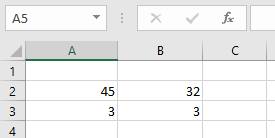
To apply the function:
- Select an empty cell and enter the function with the specified arguments:
=OR(A2>30; B2<50; B3=45)
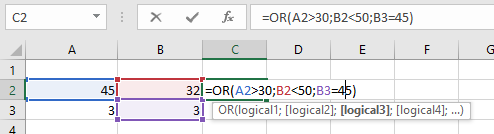
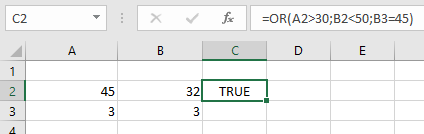
- Press Enter, and the result will be displayed (e.g., FALSE if none of the conditions are met).
NOTES WHEN USING THE OR FUNCTION
- If any logical test cannot be interpreted as a numeric or logical value, the function returns a #VALUE! error.
- The function ignores text values or empty cells in the arguments.
- It can evaluate up to 255 conditions in a single function.
- The OR function can also be combined with the AND function, depending on the required logic.