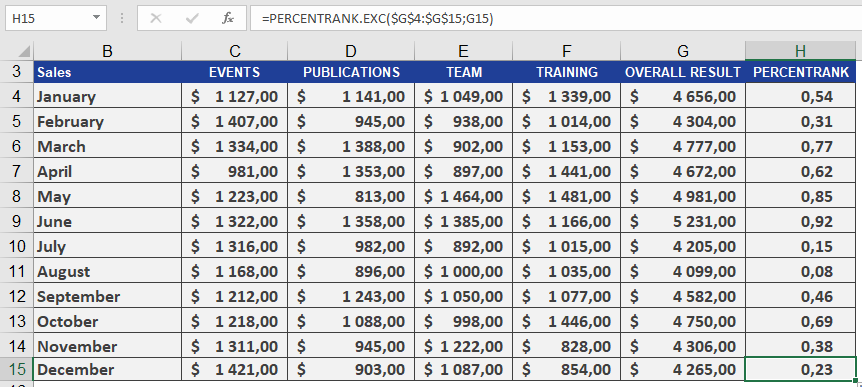
This function returns the rank of a value (alpha) in a dataset as a percentage, ranging from 0 to 1 (exclusive).
Syntax:
PERCENTRANK.EXC(array; x; [significance])
Arguments:
- array(required): The array or range of numeric data that defines the relative positions.
- x(required): The value for which you want to determine the rank.
- significance(optional): A value specifying the number of decimal places for the returned percentage. If omitted, EXC() defaults to three decimal places (0.xxx).
Background:
PERCENTRANK.EXC() and PERCENTRANK.INC() are the inverse functions of PERCENTILE.EXC() and PERCENTILE.INC(). These functions calculate the relative position of a value *x* within a dataset.
For additional details on quantiles, refer to the PERCENTILE() documentation.
Example:
For more details on how to use this function, see the figure below.