This function returns the number of possible permutations when selecting *k* elements from a set of *n* elements. A permutation is an arrangement where the order of elements matters.
Syntax:
PERMUT(number; number_chosen)
Arguments:
- number (required): The total number of elements (*n*).
- number_chosen (required): The number of elements to permute (*k*).
Background:
The PERMUT() function belongs to combinatorics, which calculates the number of ordered arrangements. Unlike COMBIN() (where order is irrelevant), PERMUT() treats different sequences as distinct.
Key Differences:
- PERMUT(): Order matters (e.g., race rankings).
- Example: Calculating possible podium finishes (1st, 2nd, 3rd) in a 10-runner race.
- COMBIN(): Order irrelevant (e.g., lottery numbers).
- Analogy: Runners would protest if podium places were reordered alphabetically, but lottery numbers remain the same regardless of sequence.
Formula:
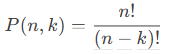
The number of permutations is calculated as:
Example:
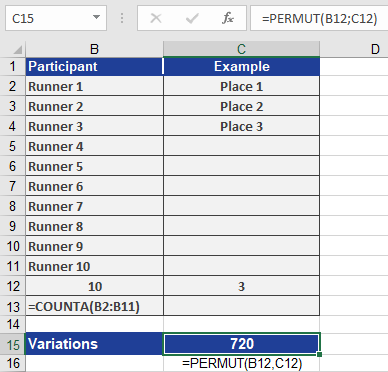
Scenario: A race with 10 runners (*n = 10*); prizes awarded for 1st, 2nd, and 3rd places (*k = 3*).
Calculation:
=PERMUT(10, 3) returns 720 possible podium arrangements.
This means there are 720 unique ways to assign gold, silver, and bronze medals among the 10 runners.
Visual Reference:
See Figure below for the result.