
Its returns the result of raising a base number to a specified exponent.
Syntax
POWER(number; power)
Arguments
| Parameter | Requirement | Valid Input |
| number | Required | Any real number (base) |
| power | Required | Real number (exponent) |
Key Properties
- Mathematical Operation:
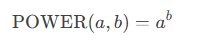
-
- Special Cases:
- a0=1 (any non-zero aa)
- 0b=0 (for b>0b>0)
- a1=a
- Special Cases:
- Error Handling:
- #NUM! if a<0a<0 and bb is non-integer (e.g., (−2)1.5(−2)1.5).
- Alternate Syntax:
Use the caret operator (^):
=5^2 // Equivalent to =POWER(5,2)
Examples
- Basic Calculations:
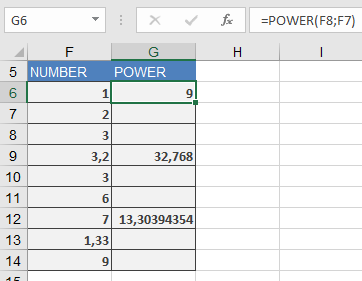
=POWER(3, 2) → Returns 9
=POWER(3.2, 3) → Returns 32.768
=POWER(7, 1.33) → Returns ≈13.3039
- Computer Science (Binary Units):
=POWER(2, 10) → Returns 1024 (1 kilobyte)
- Physics (Inverse Square Law):
=POWER(distance, -2) → Calculates intensity decay.
Related Functions
- SQRT(): Square root (=POWER(x,0.5)).
- EXP(): Natural exponentiation (exex).
- LOG(): Inverse of power functions.