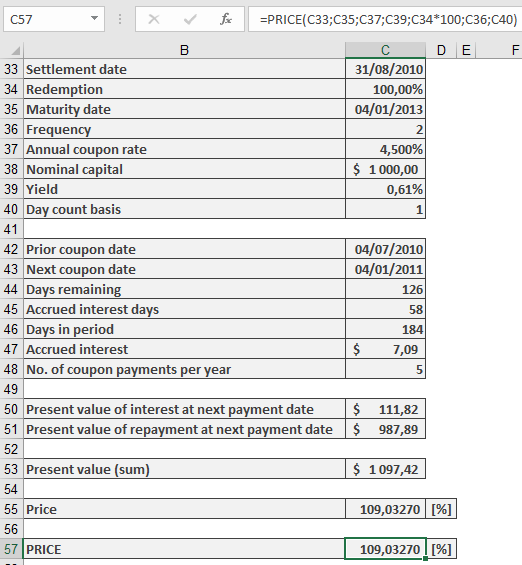
This function calculates the price of a fixed-income security (loan), meaning the purchase price excluding any accrued interest.
Syntax.
PRICE(Settlement; Maturity; Rate; Yield; Redemption; Frequency; Basis)
Arguments
- Settlement (required): The date on which the ownership of the security changes.
- Maturity (required): The date on which the loan represented by the security is repaid.
- Rate (required): The agreed-upon annual interest rate for borrowing the money.
- Yield (required): The market interest rate on the settlement date, used to discount all future payments during the calculation of the term.
- Redemption (required): The percentage of the par value of the security (assuming a nominal value of 100 monetary units) repaid at maturity.
- Frequency (required): Specifies the number of coupon payments per year. Accepted values:
- 1 = annual,
- 2 = semiannual,
- 4 = quarterly.
- Basis (optional): Defines the day count basis according to Table 15-2 referenced earlier. If omitted, Excel uses Basis = 0.
Requirements for PRICE() Arguments:
- Dates must not contain time values; decimals are truncated.
- Frequency and Basis are truncated to integers.
- If a date argument is invalid, the function returns the #NUM! error.
- Rate and Yield must be non-negative. Redemption must be positive. Otherwise, PRICE() returns the #VALUE! error.
- If Frequency is not 1, 2, or 4, or if Basis is not between 0 and 4, or if the Settlement date is later than Maturity, the function returns #NUM!.
Background.
To apply the financial principle of equivalence:
Payment by creditor = Payment by debtor
At the beginning of the transaction, the price of a fixed-income security (loan) plus accrued interest equals the present value of the debtor’s future payments stipulated by the security. The price represents a percentage of the security’s par value, assuming a par value of 100 monetary units.
When the purchase date coincides with the interest payment date for a security with annual interest payments, calculating the present value is straightforward—only the full year needs consideration. However, when ownership changes between coupon dates or when multiple coupon payments occur per year, the calculation becomes more complex. Several financial methods address this, with the most notable being Moosmüller, Braess/Fangmeyer, and ISMA (International Securities Market Association, formerly Association of International Bond Dealers, AIBD).
The ISMA method yields the same result as PRICE() for annual payments and can be adapted for semiannual and quarterly payments using the PRICE() function.
Excel Approach:
In Excel and related functions, cash value creation (discounting future payments) is performed as follows:
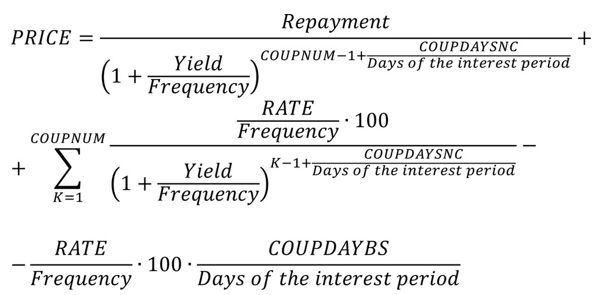
- COUPNUM: Number of coupon payments remaining after settlement.
- COUPDAYSNC: Number of days until the next coupon payment.
- COUPDAYBS: Number of days since the last coupon payment.
When Frequency = 1, this formula aligns with the ISMA method. For Frequency values of 2 or 4, Excel assumes an even distribution of Yield over the year’s periods. In contrast, the ISMA method uses a more complex period apportionment based on the relationship between nominal and effective interest, as explained in the EFFECT() and NOMINAL() function descriptions.
Thus, for multiple coupon payments per year, you can use PRICE() to calculate the ISMA price—but you must first convert the effective yield to a nominal yield using NOMINAL().
Example.