
This function calculates the probability of values falling within a specified range. If no upper limit is provided, it returns the probability of values equaling the lower limit exactly.
Syntax:
PROB(x_range; prob_range; lower_limit; [upper_limit])
Arguments:
- x_range(required): The set of possible numerical outcomes.
- prob_range(required): The corresponding probabilities for each value in x_range (must sum to 1).
- lower_limit(required): The minimum value of the target range.
- upper_limit(optional): The maximum value of the target range.
Key Requirements:
- All probabilities must be ≥0 and ≤1.
- The sum of all probabilities must equal 1.
Background:
The PROB() function aggregates probabilities for discrete outcomes. It’s particularly useful when:
- Working with known probability distributions
- Analyzing scenarios with defined outcome likelihoods
- Calculating cumulative probabilities for value ranges
Medical Example:
A doctor analyzes patient weight probabilities based on historical data:
*Data Setup (Figure below)*:
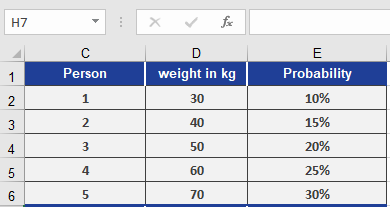
- Weights (x_range): [100, 110, 120, 140, 150] lbs
- Probabilities (prob_range): [0.1, 0.15, 0.25, 0.3, 0.2]
Calculations (Figure below):
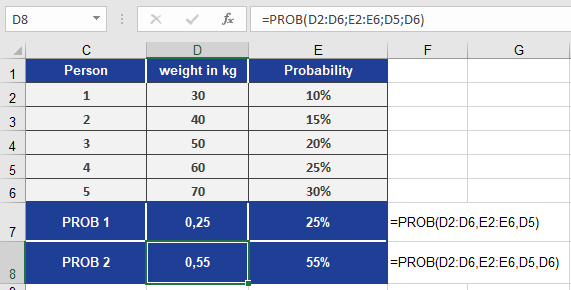
- Exact weight probability:
- =PROB(weights, probs, 120)→ 25%
(Probability of weighing exactly 120 lbs)
- =PROB(weights, probs, 120)→ 25%
- Weight range probability:
- =PROB(weights, probs, 120, 140)→ 55%
(Probability of weighing between 120-140 lbs)
- =PROB(weights, probs, 120, 140)→ 55%
Key Notes:
- When upper_limit is omitted, PROB() treats lower_limit as both min and max.
- The function sums probabilities for all x_values within the specified bounds.