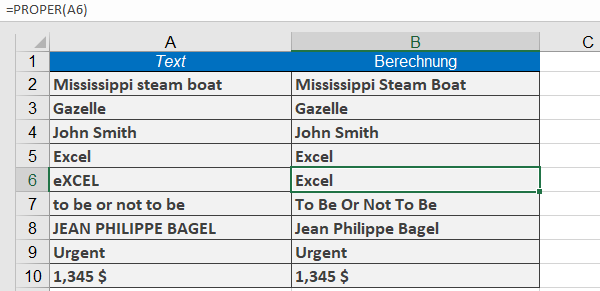
This function converts the first character of each word in a text string to uppercase and all subsequent characters to lowercase.
Syntax
PROPER(text)
Arguments
- text(required): The text to convert, which can be:
- A string enclosed in quotation marks
- A formula that returns text
- A reference to a cell containing text
Background
The PROPER() function is particularly useful for:
- Formatting imported data that is in all uppercase.
- Standardizing names or titles (including hyphenated names).
- Numeric values are treated the same as in the UPPER()
Examples
- =PROPER(« charles dickens »)returns Charles Dickens.
- =PROPER(« Excel »)returns Excel.
- =PROPER(« eXCEL »)returns Excel.
- =PROPER(« JEAN PHILIPPE BAGEL »)returns Jean Philippe Bagel.