
Its converts an angle from degrees to radians.
Syntax
RADIANS(angle)
Argument
| Parameter | Requirement | Valid Input |
| angle | Required | Angle in degrees (°) |
Key Properties
- Conversion Formula:
radians=degrees×(π180)
-
- π in Excel: PI() ≈ 3.14159265358979.
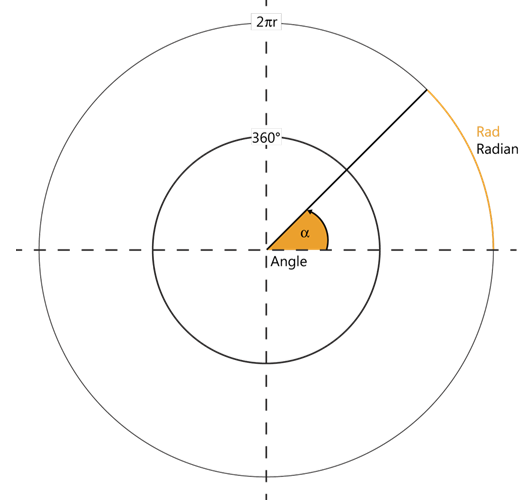
- Critical Values:
| Degrees | Radians |
| 0° | 0 |
| 30° | π/6 ≈ 0.5236 |
| 45° | π/4 ≈ 0.7854 |
| 90° | π/2 ≈ 1.5708 |
| 180° | π ≈ 3.1416 |
| 360° | 2π ≈ 6.2832 |
- Inverse Function:
- DEGREES() converts radians back to degrees.
Examples
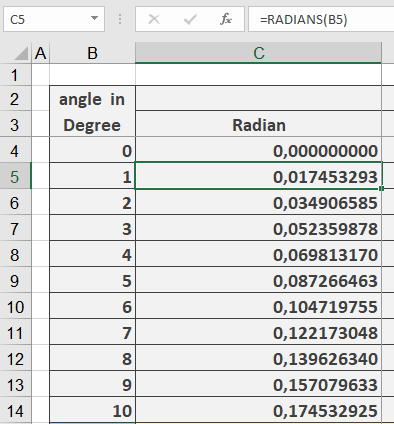
- Basic Conversion:
=RADIANS(1) → Returns 0.017453293
=RADIANS(45) → Returns 0.785398163
=RADIANS(90) → Returns 1.570796327
- Trigonometric Calculations:
=SIN(RADIANS(30)) → Returns 0.5 (sin of 30°)
- Real-World Use:
- Navigation: Convert nautical miles to radians for arc length.
- Physics: Angular velocity calculations.
Why This Matters
- Excel’s Default: Trigonometric functions (SIN, COS, TAN) use radians.
- Precision: Avoids manual conversion errors.
- Scientific Standards: Radians are natural units in calculus/physics.
Related Functions
- DEGREES(): Radians to degrees.
- SIN()/COS()/TAN(): Trigonometric functions.
- PI(): Returns π for manual calculations.