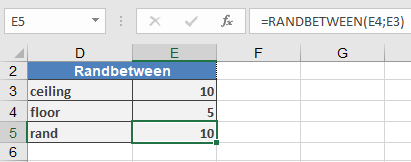
This function returns a random integer from a specified range. A new random number is generated every time the worksheet is recalculated.
Syntax:
RANDBETWEEN(bottom; top)
Arguments:
- bottom(required) – The smallest integer RANDBETWEEN() can return.
- top(required) – The largest integer RANDBETWEEN() can return.
Background:
Random values are essential in engineering and natural sciences for simulating processes.
To generate a random date, the input must be provided as a numerical value.
Example:
the practical example for the RANDBETWEEN() function.