
Its calculates the periodic interest rate for a loan or investment based on constant periodic payments and/or a lump sum amount.
Syntax
RATE(Nper; Pmt; Pv; [Fv]; [Type]; [Guess])
Arguments
| Argument | Requirement | Description | Financial Context |
| Nper | Required | Total number of periods | Loan term/investment horizon |
| Pmt | Conditionally Required | Payment per period | Annuity amount |
| Pv | Conditionally Required | Present value | Loan principal/initial investment |
| [Fv] | Optional | Future value | Target balance/residual value |
| [Type] | Optional | Payment timing: 0 = end period (default) 1 = beginning period |
Cash flow timing |
| [Guess] | Optional | Starting guess for iterative calculation (default=10%) | Initial estimate |
Note: Either Pmt or Fv must be provided.
Calculation Method
Uses iterative approximation to solve the time value of money equation:
Pv + Σ[Pmt/(1+Rate)^k] + Fv/(1+Rate)^Nper = 0
where k ranges from 1 to Nper (adjusted for Type).
Key Applications
- Investment Yield Analysis
- Loan Interest Determination
- Annuity Rate Calculation
- Capital Budgeting (IRR alternative)
Examples
- Retirement Savings Target
Scenario:
$10,000 growing to $25,000 in 15 years.
Calculation:
=RATE(15,,-10000,25000)
Result: 6.3% p.a.
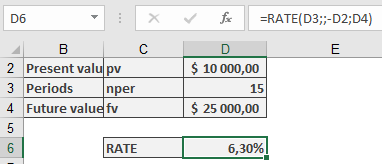
Required annual return to meet goal.
- Pension Annuity Funding
Scenario:
$100,000 fund providing $750/month for 15 years (payments at start of month).
Calculation:
=RATE(15*12,-750,100000,,1)
Result: 0.3548% monthly (4.26% p.a.)
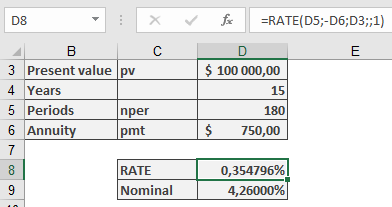
Required monthly compounding rate.
- Mortgage Pricing
Scenario:
$175,000 loan with $1,000 monthly payments over 30 years.
Calculation:
=RATE(30*12,-1000,175000)
Result: 0.4632% monthly (5.56% p.a.)
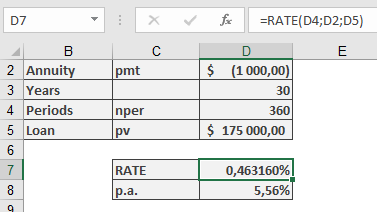
Effective annual interest rate.
Technical Notes
- Iterative Process:
- Begins with Guess value (default 10%)
- Uses Newton-Raphson approximation
- May fail to converge if no solution exists
- Complementary Functions:
- IRR(): For irregular cash flows
- XIRR(): For irregular dates
- NPER(): For term calculations
- Financial Best Practices:
- For monthly results, multiply by 12 for APR
- Use negative values for cash outflows
- Combine with ROUND() for presentation:
=ROUND(RATE(…)*12,2)& »% p.a. »