
The RIGHT() function extracts the specified number of characters from the end of a string.
The RIGHTB() function performs the same operation for double-byte character sets (DBCS), counting bytes instead of characters.
Syntax
RIGHT(text; num_chars)
RIGHTB(text; num_bytes)
Arguments
- text (required): The string containing characters to extract
- num_chars/num_bytes (optional):
- Number of characters/bytes to extract (default=1 if omitted)
- Must be ≥0
Key Features
- Returns the entire string if num_chars exceeds string length
- Part of the essential text function trio with LEFT() and MID()
- Ideal for structured data like:
- ZIP/postal codes
- ISBN numbers
- Formatted identifiers
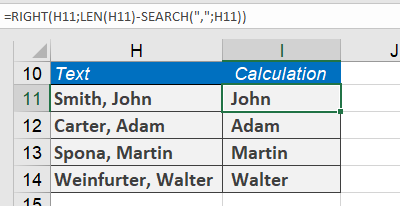
Example: Extracting Last Names
For cell H4 containing « John Smith »:
=RIGHT(H4; LEN(H4) – SEARCH( » « ; H4))
How it works:
- SEARCH( » « ;H4) finds the space position (5)
- LEN(H4) gets total length (10)
- Calculation: 10 – 5 = 5 characters to extract
- Returns « Smith »
Error Handling
- Returns #VALUE! if num_chars is negative
- Handles numbers in text by treating them as characters