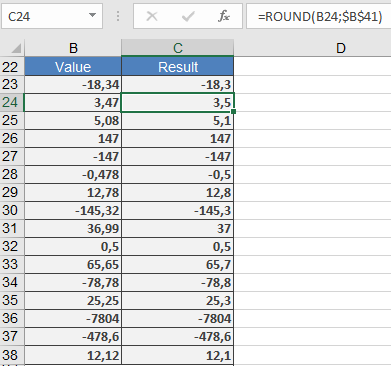
This function rounds a number to a specified number of decimal places.
Syntax:
ROUND(number; num_digits)
Arguments:
- number (required) – The number you want to round.
- num_digits (required) – The number of decimal places to round to.
Background:
Rounding is essential in our number system, as most values are rounded at some point. Reasons for rounding include:
- Improving clarity and simplifying calculations (e.g., demographic statistics, pi (π)).
- Standardizing monetary values (e.g., prices rounded to two decimal places, since the smallest unit is one cent).
Rounding Rules:
- If the digit after the rounding position is 5 or greater, the number is rounded up.
- If the digit is 4 or less, the number is rounded down.
- Negative values are rounded away from zero (i.e., upward in absolute terms).
Examples:
- $3.2549 → $3.25 (4 ≤ 4, round down)
- $3.2551 → $3.26 (5 ≥ 5, round up)
- –$3.2549 → –$3.25
- –$3.2551 → –$3.26
Effect of num_digits:
- num_digits > 0: Rounds to the specified decimal places.
- num_digits = 0: Rounds to the nearest integer.
- num_digits < 0: Rounds to the left of the decimal point (e.g., tens, hundreds).
Example: