
The SEARCH() function locates the starting position of a substring within text, beginning at start_num.
The SEARCHB() function performs the same operation for double-byte character sets (counting bytes).
Syntax
SEARCH(find_text; within_text; [start_num])
SEARCHB(find_text; within_text; [start_byte])
Key Features
- Case-insensitive (unlike FIND())
- Supports wildcards:
- ? matches any single character
- * matches any sequence of characters
- Use ~ to search for literal ? or *
Arguments
| Argument | Required | Description |
| find_text | Yes | Text to locate (can include wildcards) |
| within_text | Yes | Text to search through |
| start_num/start_byte | No | Starting position (default=1) |
Behavior Notes
- Returns #VALUE! if:
- Text not found
- start_num ≤ 0
- start_num > length of within_text
- Returns 1 (or start_num) if searching for empty string (« »)
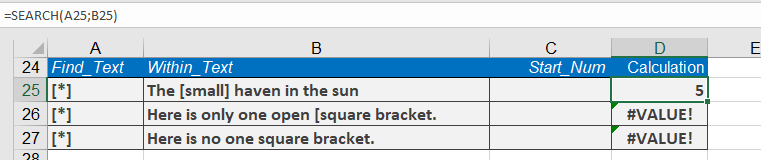
Example: Wildcard Search
To find any text in square brackets:
=SEARCH(« [*] »; « Product [small] version »)
Returns 5 (position of [small])
Comparison with FIND
| Feature | SEARCH() | FIND() |
| Case-sensitive | No | Yes |
| Wildcards | Yes | No |
| Error if not found | #VALUE! | #VALUE! |
Practical Applications
- Extracting substrings (combined with MID())
- Validating text patterns
- Processing structured data like codes or identifiers