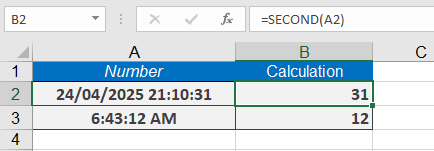
This function extracts the seconds from a serial number (a time value, with or without a date). The returned value is an integer between 0 and 59.
Syntax: SECOND(serial_number)
Arguments:
- serial_number (required) – A valid time (or a date-time value).
Background
Like the HOUR() and MINUTE() functions, SECOND() allows you to extract a component of a time value for use in calculations.
Times can be entered in different formats:
- As a text string in quotation marks (e.g., « 06:43:12 »),
- As a decimal number (e.g., 0.27986111 for 06:43),
- Or as the result of other formulas or functions (e.g., NOW()).
Examples:
The following are examples where the function SECOND() extracts seconds from a date/time value:
- =SECOND(« 07/13/2008 20:48:31 ») → Returns 31.
- =SECOND(« 06:43:12 ») → Returns 12.
- =SECOND(NOW()) → Returns the current second.