
Its returns the trigonometric sine of an angle. The sine represents the ratio of the length of the opposite side to the hypotenuse in a right-angled triangle.
Syntax:
SIN(number)
Argument:
| Argument | Description |
| number (required) | The angle in radians for which you want to calculate the sine |
Key Concepts:
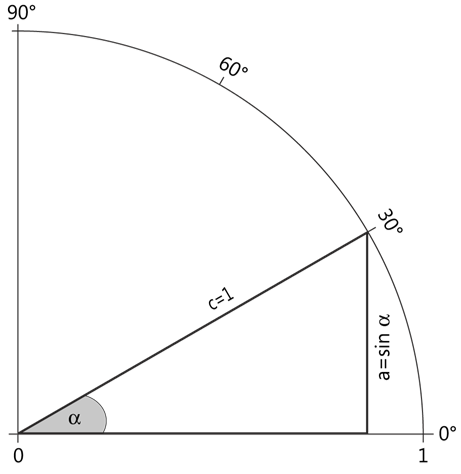
- Right Triangle Relationship: In a right triangle, sin(α) = opposite side / hypotenuse
- Unit Circle Properties:
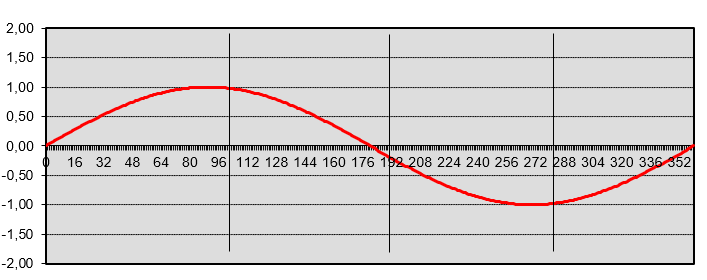
- Sine values range between -1 and 1
- Reaches maximum (1) at 90° (π/2 radians)
- Periodicity: The sine function is periodic with 2π (360°) period
Important Notes:
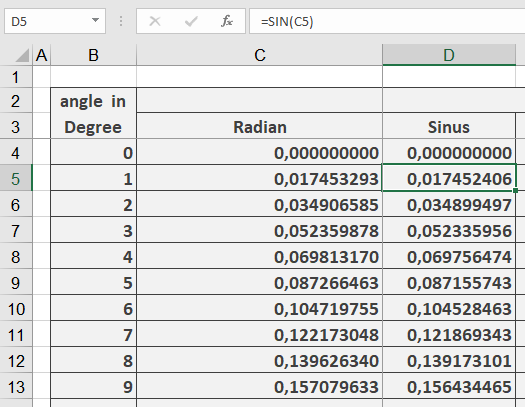
- Excel requires angles in radians
- To convert degrees to radians:
- Multiply by PI()/180, or
- Use RADIANS() function
- The function returns results between -1 and 1
Example:
Visualization Tip:
The sine curve can be plotted with:
- x-axis: Angle (in radians)
- y-axis: SIN(x)
This produces the characteristic wave pattern that oscillates between -1 and 1.
Common Applications:
- Physics (wave motions)
- Engineering (oscillations)
- Navigation (distance calculations)
- Computer graphics (wave patterns)