
Its calculates straight-line depreciation for an asset over a specified period, allocating equal depreciation expense in each accounting period.
Syntax
SLN(Cost; Salvage; Life)
Arguments
| Argument | Required | Description | Validation Rules |
| Cost | Yes | Initial asset value (purchase price + incidental costs) | Must be positive |
| Salvage | Yes | Asset value at end of depreciation | Must be ≥ 0 |
| Life | Yes | Useful life in periods | Must be integer > 0 |
Error Conditions
- #VALUE!: Non-numeric inputs
- #NUM!: Negative values or invalid Life
Calculation Method
Annual Depreciation = (Cost – Salvage) / Life
Key Features
- Equal Periodic Charges: Allocates depreciation evenly across all periods
- Common Applications:
- Financial reporting
- Tax calculations (where permitted)
- Budget forecasting
Example
Asset Depreciation Scenario:
- Purchase cost: $1,000
- Salvage value: $100
- Useful life: 5 years
Calculation:
=SLN(1000, 100, 5)
Result: $180 per year
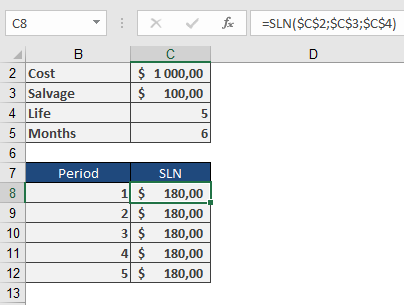
Depreciation Schedule:
| Year | Beginning Value | Depreciation | Ending Value |
| 1 | $1,000 | $180 | $820 |
| 2 | $820 | $180 | $640 |
| 3 | $640 | $180 | $460 |
| 4 | $460 | $180 | $280 |
| 5 | $280 | $180 | $100 |
Implementation Notes
- First-Year Convention:
- For partial-year depreciation, manually adjust first period
- Use SLN() for subsequent full periods
- Best Practices:
=ROUND(SLN(Cost, Salvage, Life), 2)
Ensures compliance with financial reporting standards
- Complementary Functions:
- DB(): Declining balance method
- DDB(): Double-declining balance
- SYD(): Sum-of-years’ digits
Technical Considerations
- Tax Compliance:
- Verify local regulations permit straight-line method
- Some jurisdictions require accelerated methods
- Asset Management:
- Combine with physical depreciation tracking
- Useful for capital budgeting analysis