
The SLN function is used to calculate the depreciation of an asset using the straight-line depreciation method for a single period. This method evenly spreads the cost of the asset over its useful life.
The SLN function uses the following syntax for its calculations:
=SLN(cost; salvage; life)
- Cost (Required Argument): This is the initial cost of the asset.
- Salvage (Required Argument): This is the value of the asset at the end of its useful life, also known as the salvage value.
- Life (Required Argument): This represents the number of periods over which the asset depreciates, often referred to as the useful life of the asset.
USING THE SLN FUNCTION
Using the table below, let’s calculate the depreciation of an asset with an initial cost of £55000, a salvage value of £8 500, and a useful life of 10 years.
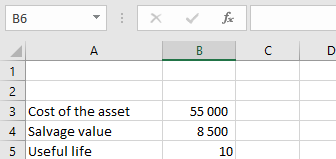
To calculate the depreciation:
- Select an empty cell and enter the function with its arguments:
=SLN(B3; B4; B5)
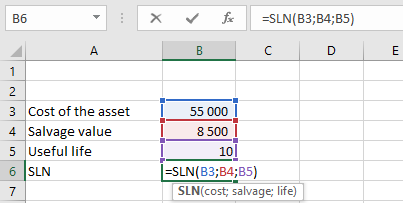
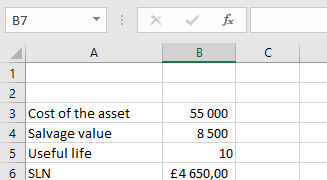
- Press Enter, and the depreciation value will be calculated. In this example, the depreciation value is £4 650,00, as shown in the table below.
IMPORTANT NOTES WHEN USING THE SLN FUNCTION
- A #DIV/0! error occurs if the life argument is equal to zero.
- A #VALUE! error occurs if any of the arguments provided are non-numeric.