
Returns the k-th smallest value in a dataset. This function is useful for extracting values with specific relative rankings without sorting the data.
Syntax:
SMALL(array; k)
Arguments:
- array(required): The range or array containing the dataset
- k(required): The ordinal position of the value to return (1 = smallest, n = largest)
Key Notes:
- Error Conditions:
- Returns #NUM!if:
- The array is empty
- k ≤ 0
- k exceeds the number of data points
- Returns #NUM!if:
- Special Cases:
- SMALL(array, 1)returns the minimum value
- SMALL(array, n)(where n = count of values) returns the maximum value
- Counterpart: This function complements LARGE()
Example – Football Attendance Analysis:
A league analyzes game attendance data:
- Dataset: Unsorted list of daily spectator counts
- Objective: Find days with lowest attendance
- Solution:
- =SMALL(B2:B31, 1)→ Absolute minimum
- =SMALL(B2:B31, 5)→ 5th smallest attendance
Result:
Figure below demonstrates the function returning:
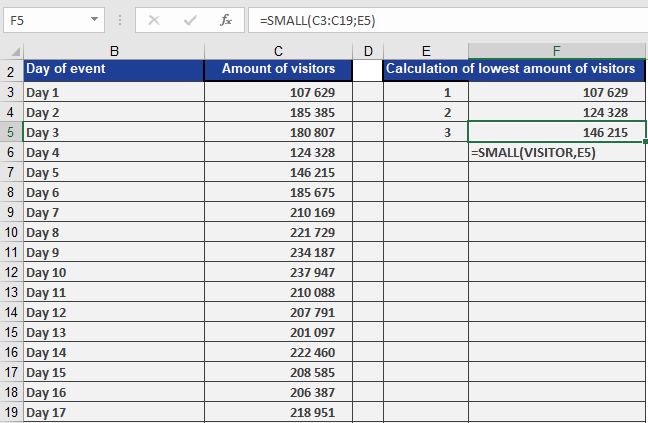
- 1st smallest value (smallest attendance day)
- 2nd smallest value