
This function returns the square root of a number.
Syntax:
SQRT(number)
Argument:
- number(required) – The number for which you want to calculate the square root.
Background:
The root function is the inverse of exponentiation.
- The base (b) is called the radicand
- x represents the root order
- When the root order is 2, it is called a square root
Note:
The SQRT() function only returns the square root of positive numbers. If the input number is negative, the function returns a #NUM! error.
Example:
Calculate the dimensions of a square building lot with the same area as a rectangular lot measuring 19.5 × 10.5 meters.
- Rounded result:
=ROUND(SQRT(PRODUCT(B11;B12)),2)
Returns: 14,31meters
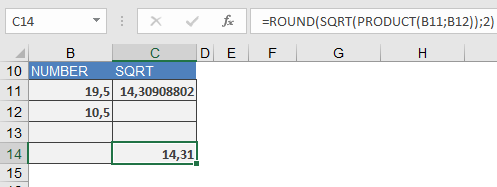
Calculation steps explained:
- Calculate the area (product of dimensions):
=PRODUCT(19.5,10.5) - Extract the square root of the area:
=SQRT(PRODUCT(19.5,10.5)) - Round the result to 2 decimal places:
=ROUND(SQRT(…),2)