
This function returns the square root of a number multiplied by π (pi).
Syntax:
SQRTPI(number)
Argument:
- number(required) – The positive number to be multiplied by π before taking the square root.
Background:
- Calculates √(number × π)
- Only accepts positive numbers
- Returns #NUM!error for negative inputs
Examples:
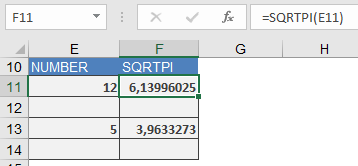
- =SQRTPI(12)returns 6,13996025
(√(12×π) ≈ √37.6991118 ≈ 6.13996025) - =SQRTPI(5)returns 3,9633273
(√(5×π) ≈ √15.7079633 ≈ 3.9633273)
Key Notes:
- Equivalent to =SQRT(number*PI())
- Useful for circular calculations (e.g., wave functions, geometry)
- More efficient than separate multiplication and root operations
Common Applications:
- Physics (wave equations)
- Engineering (structural calculations)
- Geometry (circle-related formulas)