
Its adds all values in a range that meet specified criteria.
Syntax:
SUMIF(range; criteria; [sum_range])
Arguments:
| Argument | Description |
| range (required) | Range of cells to evaluate against the criteria |
| criteria (required) | Condition that determines which cells to add (number, expression, or text) |
| sum_range (optional) | Actual cells to sum (if omitted, uses ‘range’ for summing) |
Key Features:
- Criteria Formats:
- Number: 32
- Comparison: « >32 »
- Text: « apples » (exact match) or « a* » (wildcard match)
- Cell reference: A9
- Behavior:
- Case-insensitive for text criteria
- Supports wildcards (* for multiple characters, ? for single character)
- Omitting sum_range sums the criteria range itself
Example: Sales by Representative
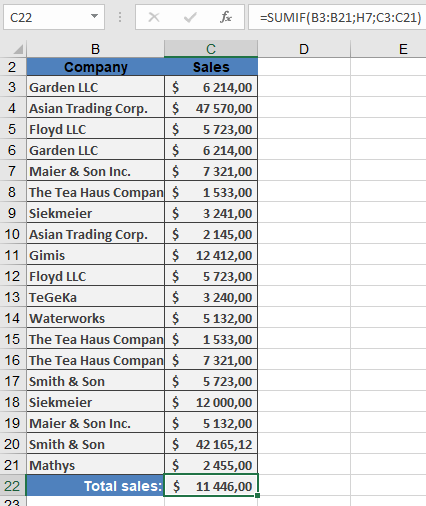
Notes:
- For multiple criteria, use SUMIFS()
- Related functions:
- COUNTIF(): Count cells meeting criteria
- AVERAGEIF(): Average cells meeting criteria
Common Errors:
- #VALUE!: Incompatible criteria type
- Incorrect sums: Verify ranges are same size when using sum_range