
The SUMIFS function adds cells that meet multiple specified conditions. These conditions can evaluate dates, numbers, and text values. The function supports logical operators (<, >, ≤, etc.) and wildcard characters (*, ?).
The SUMIFS function uses these arguments:
=SUMIFS(sum_range, criteria_range1, criteria1, [criteria_range2, criteria2], …)
Sum_range: The range of cells to sum
Criteria_range1: The range where the first condition will be applied
Criteria1: The condition that determines which cells to include
Criteria_range2: (Optional) Additional range for second condition
USING THE SUMIFS FUNCTION

Let’s calculate the total quantity of Apples supplied by Pete:
- Select an empty cell
- Enter the formula:
=SUMIFS(C2:C6, A2:A6, « apples », B2:B6, « Pete »)- C2:C6 contains quantities to sum
- A2:A6 contains product names
- « apples » is our product criteria
- B2:B6 contains supplier names
- « Pete » is our supplier criteria
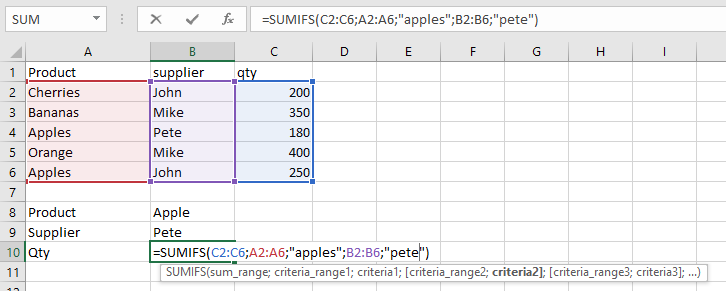
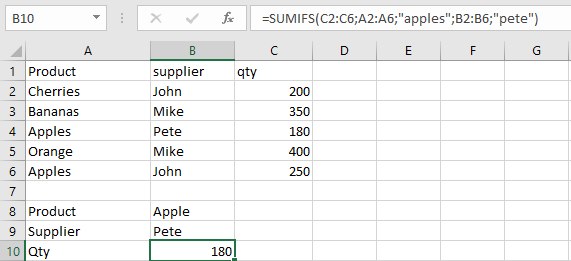
- Press Enter to see the result: 180
IMPORTANT NOTES
- Always enclose text criteria in double quotes (e.g., « orange »)
- All criteria ranges must match the size of sum_range
- #VALUE! error appears when:
- Ranges have different sizes
- Cell references in criteria are incorrectly quoted
- SUMIFS works with cell ranges, not arrays