
Its multiplies corresponding components in given arrays and returns the sum of those products.
Syntax:
SUMPRODUCT(array1; [array2]; [array3]; …)
Arguments:
| Argument | Description |
| array1 (required) | First array of values |
| array2 (required) | Second array of values |
| array3,… (optional) | Additional arrays (up to 255 in modern Excel) |
Key Features:
- Calculation Method:
- Performs element-wise multiplication (a₁×b₁, a₂×b₂,…)
- Sums all resulting products
- Formula: Σ(array1[i] × array2[i] × …)
- Requirements:
- All arrays must have identical dimensions
- Non-numeric values are treated as zero
- Returns #VALUE! if arrays have different sizes
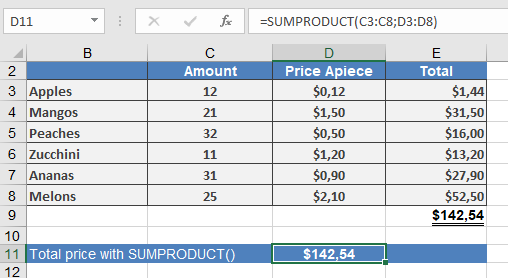
Example: Product Price Calculation
Common Errors:
- #VALUE!: Array size mismatch
- Incorrect results: Hidden text values treated as zero
Related Functions:
- SUM(): Simple addition
- MMULT(): Matrix multiplication
- SUMIFS(): Conditional sum with multiple criteria
Note:
While originally designed for simple array multiplication, SUMPRODUCT has become a powerful tool for complex array operations in Excel.