This function returns the sum of the sum of squares of corresponding values in two arrays. The sum of the sum of squares is a common term in many statistical calculations.
Syntax
SUMX2PY2(array_x; array_y)
Arguments
- array_x(required) – The first array or range of values.
- array_y(required) – The second array or range of values.
Background
- The arguments should be numbers, names, arrays, or references containing numbers.
- If an array or a reference argument contains text, logical values, or empty cells, those values are ignored. However, cells with the value zero are included.
- If array_xand array_y have a different number of values, the SUMX2PY2() function returns the #N/A
The equation for the sum of the sum of squares is:
Σ(x² + y²)
EXAMPLE
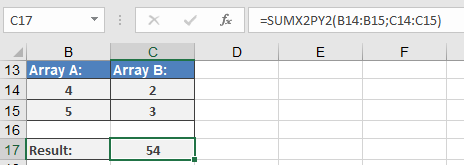
The solution of this equation is built for the example (see Figure below) as follows:
- In two specified ranges:
- Range A:4, 5
- Range B:2, 3
The square of each value is calculated:
- Range A:16, 25
- Range B:4, 9
- The squares of all values in each range are summed:
- Range A:16 + 25 = 41
- Range B:4 + 9 = 13
- The sums are added together (see Figure 16-36):
41 + 13 = 54