
The SYD function is used to calculate the sum-of-years’ depreciation of an asset over a specific period within its useful life. This method focuses on the initial cost of the asset, its salvage value, and the number of periods over which the asset depreciates.
The SYD function uses the following syntax for its calculations:
=SYD(cost; salvage; life; per)
- Cost (Required Argument): This is the initial cost of the asset.
- Salvage (Required Argument): This is the value of the asset at the end of its useful life, also known as the salvage value.
- Life (Required Argument): This represents the total number of periods over which the asset depreciates, often referred to as the useful life of the asset.
- Per (Required Argument): This is the specific period for which the depreciation is being calculated.
USING THE SYD FUNCTION
Let’s assume we want to calculate the depreciation of an asset with an initial cost of £400 000, a salvage value of £6 000, and a useful life of 8 years. We want to calculate the depreciation for the 3rd year.
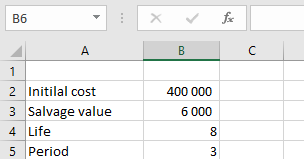
To calculate the sum-of-years’ depreciation:
- Select an empty cell and enter the function with its arguments:
=SYD(B2; B3; B4, B5)
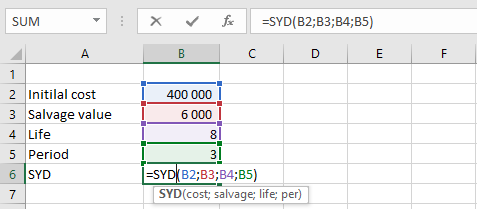
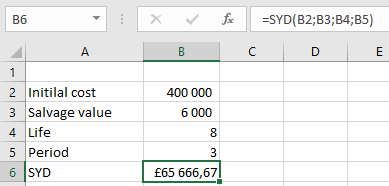
- Press Enter, and the depreciation value for the specified period will be calculated. In this example, the depreciation value is £65 666,67, as shown in the table below.
IMPORTANT NOTES WHEN USING THE SYD FUNCTION
- The life and per arguments must use the same units of time (e.g., days, months, or years).
- A #VALUE! error occurs if any of the arguments provided are non-numeric.
- A #NUM! error occurs in the following cases:
- If the salvage value is less than zero.
- If the life or per argument is less than or equal to zero.
- If the per argument is greater than the life argument.