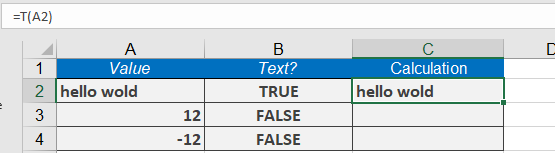
This function checks whether an entry is text and returns the text value. If the entry is not a text value, the return value is empty.
Syntax:
T(value)
Arguments:
- value(required): The expression (a number, text, a formula without an equal sign, a logical value, an error value, a reference, or a name) to check.
Background:
The T() function is provided for compatibility with other spreadsheet software. You do not normally need to use the T() function in formulas, because Excel automatically converts values as needed.
When using this function, keep in mind that:
- Numbers are notconverted into numerals; instead, the result is an empty string.
- Logical values (TRUE/FALSE) also return an empty string.
- Error values remain as error values and are notconverted into text.
Example of the T() Function
- Suppose you have the following data in cell A1:
« Hello World »(a text string) - Formula:
=T(A2) - Result:
« Hello World »(returns the text unchanged)