
This function returns the hyperbolic tangent of a number.
Syntax
TANH(number)
Argument
- number (required) – Any real number.
Background
- The hyperbolic tangent is part of the hyperbolic functions, which (like trigonometric functions) are defined for all real and complex numbers. However, Excel only supports real-number arguments for hyperbolic functions.
- The formula for the hyperbolic tangent is:
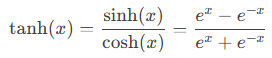
The last term highlights its similarity to trigonometric functions.
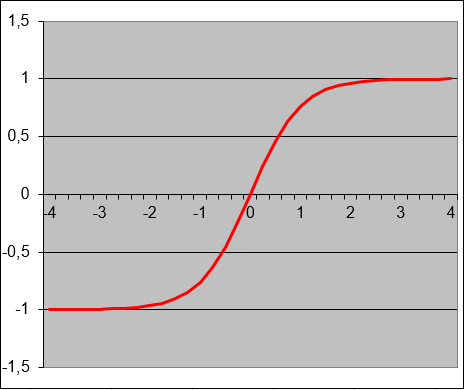
- The hyperbolic tangent is widely used in engineering and natural sciences for research and development (see Figure below).
Missing Cotangent Functions
- Unlike trigonometric functions (sin, cos, tan, cot), Excel does not include built-in hyperbolic cotangent (COTH) or trigonometric cotangent (COT) functions.
- However, both can be derived as reciprocals of their tangent counterparts:
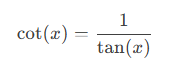
- Trigonometric cotangent:
-
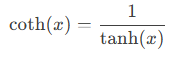
- Hyperbolic cotangent:
- Workaround in Excel:
Instead of =COTH(A1) (which does not exist), use:
=1/TANH(A1)
Example: Wave Propagation Speed Calculation
Application:
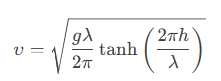
The hyperbolic tangent is used to calculate the propagation speed (υυ) of waves, given:
- Gravity acceleration (gg) in [m/s²],
- Wave length (λλ) in [m],
- Water depth (hh) in [m].
Formula:
Approximations for Shallow/Deep Water:
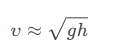
- Shallow water (h≪λh≪λ):
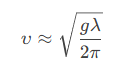
- Deep water (h≫λh≫λ):
Additional Examples
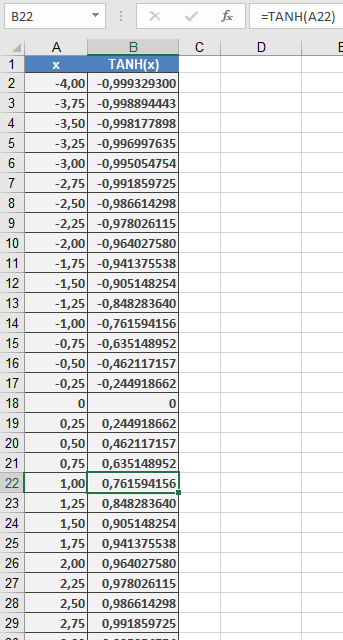
=TANH(0) // Returns 0
=TANH(1) // Returns 0.761594156
=TANH(-1) // Returns -0.76159416
=TANH(10) // Returns 1 (approaches asymptotically)
=TANH(-10) // Returns -1 (approaches asymptotically)
Key Properties:
- Output ranges between -1 and 1.
- For large positive/negative inputs, TANH() approaches ±1.