
Its calculates the yield to maturity of a U.S. Treasury bill (T-bill) as an annualized percentage, based on the purchase price and time to maturity.
Syntax
TBILLYIELD(Settlement; Maturity; Price)
Arguments
| Argument | Required | Description | Validation Rules |
| Settlement | Yes | Trade settlement date (purchase date). | Must be valid date < Maturity. |
| Maturity | Yes | Maturity/redemption date. | Must be ≤ 1 year after Settlement. |
| Price | Yes | Purchase price per $100 face value. | Must be positive and < 100 (discounted). |
Error Conditions
- #VALUE!: Invalid date format.
- #NUM!: If:
- Settlement ≥ Maturity
- Maturity > 1 year after Settlement
- Price ≤ 0 or ≥ 100
Background
T-bills are zero-coupon securities sold at a discount. The yield represents the annualized return if held to maturity.
Key Formula
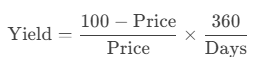
Where:
- Days = Actual calendar days between Settlement and Maturity.
- Uses 360-day year (consistent with U.S. banking conventions).
Example
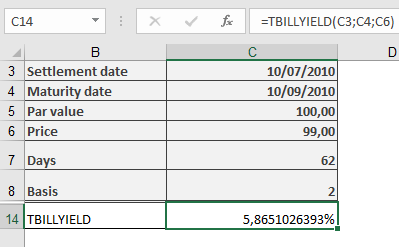
T-Bill Investment:
Key Notes
- Comparison with Other Functions
- YIELDDISC(Basis=2) matches TBILLYIELD().
- RECEIVED() calculates maturity value, not yield.
- Practical Use
- Compare T-bill returns with other short-term investments.
- Adjusts for the 360-day banking year (no compounding).
- Limitations
- Only valid for T-bills with maturities ≤ 1 year.
- Price must be < 100 (discounted securities).