
This function converts a value into text in a specific number format.
Syntax:
TEXT(value; format_text)
Arguments:
- value (required): A number, a formula that evaluates to a numeric value, or a reference to a cell containing a numeric value.
- format_text (required): A number format, which is one of those in the Custom category box on the Number tab in the Format Cells dialog box.
Background:
You might need to convert numeric values to text to link static text with calculations. The TEXT() function not only converts numeric values to text but also allows you to use the number formats available in the Format Cells dialog box.
In the format_text argument, you can specify custom formats. However, the formats have the following restrictions:
- Formats cannot contain an asterisk (*).
- The General number format is not allowed.
- Colors (e.g., red for negative values) are ignored.
The difference between the Format Cells command and the TEXT() function is that TEXT() returns text. A number formatted with Format Cells remains a numeric value. You can still use numbers converted with TEXT() in other formulas because Excel automatically converts text-formatted numbers back to numeric values for calculations.
Examples
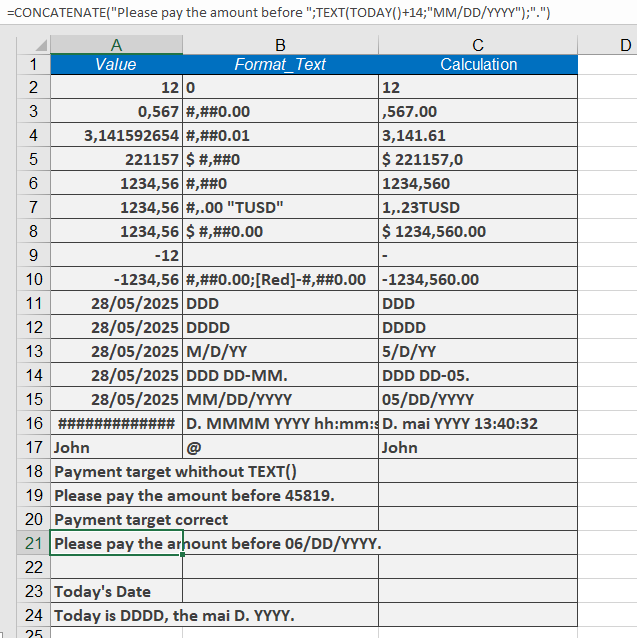
- Dynamic Payment Date in an Invoice
To display a payment due date (14 days from today) in a readable format:
Formula:
=CONCATENATE(« Please pay before « ; TEXT(TODAY()+14; « MM/DD/YYYY »); ». »)
Result :
« Please pay before 06/DD/YY. »
Without TEXT():
=CONCATENATE(« Please pay before « ; TODAY()+14; « . »)
Result: « Please pay before 40527. » (Excel’s date serial number, which is unreadable to users).
- Current Date in a Sentence
To format today’s date as a full sentence:
Formula:
= »Today is » & TEXT(TODAY(); « DDDD ») & « , » & TEXT(TODAY(); « MMMM D; YYYY ») & « . »
Result (May 28, 2025):
« Today is Wednesday, may 28, 2025. »
Key Notes
- Use TEXT() to force a specific format (e.g., dates, currency) when combining numbers with text.
- Avoid using TEXT() for calculations, as it converts numbers to strings (though Excel may auto-convert them back in formulas).
- For standalone number formatting (without text concatenation), Format Cells is preferable.