Flips the orientation of a range or array, converting rows to columns and vice versa.
Syntax:
TRANSPOSE(array)
Background. Use TRANSPOSE() as an array formula for a range that includes the same number of rows or columns as the initial array. The rows and columns are exchanged: The rows in the “old” array become the columns in the “new” array. The first row becomes the first column, the second row becomes the second column, and so on.
If you don’t use the necessary number of rows or columns in the destination range, the missing content is truncated. If you use too many rows or columns, the excess cells are filled with the #N/A error. When you use array constants (numbers or text in braces) in the expression
{=TRANSPOSE({11,12,13;21,22,23})}
the argument is interpreted as an array with two rows and three columns, and the result fits into an array with three rows and two columns. In the formula
{=TRANSPOSE({1;2;3;4})}
the argument is a single column that is converted into a row.
Key Features:
- Input: Requires a range (e.g., A1:B3) or array constant (e.g., {1,2;3,4}).
- Output: Returns a reoriented array where:
- Original rows become columns
- Original columns become rows
- Dynamic Arrays (Excel 365+): Automatically spills results without Ctrl+Shift+Enter.
Example
Arrays and vectors are used for calculations in linear algebra, linear optimization, and decision theory. Vectors are always interpreted as column vectors. In this case, the scalar product of two vectors is the array multiplication of the first vector and the second transposed vector. For this purpose, Excel provides the MMULT() function for array multiplications.
- The norm of the n-dimensional square array A can be calculated like this: Calculate the number resulting from the maximum of all scalar products between A and x if x iterates all vectors with the norm, 1 (the root from the scalar product of x with itself).
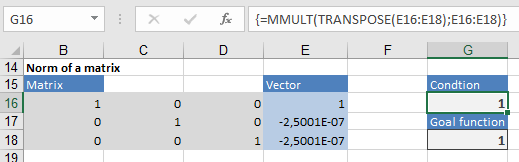
This is a task for the Solver, an Excel add-in that you must activate. Assume that this three-dimensional array includes B16 through D18. You use a placeholder for all vectors x in E16 through E18 (dynamic cells). You enter the scalar product of x with itself in G16 (a secondary condition):
{=MMULT(TRANSPOSE(E16:E18);E16:E18)}
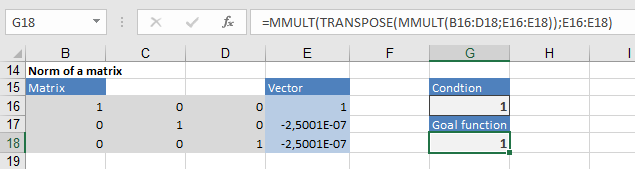
You enter the formula that calculates the scalar product of Ax with x in G18:
=MMULT(TRANSPOSE(MMULT(B16:D18;E16:E18));E16:E18)