
This function calculates the variance based on the entire population. Unlike VAR.P(), VARPA() includes numbers, text, and logical values (TRUE and FALSE) in its calculation.
Syntax. VARPA(value1; value2; …)
Arguments
- value1 (required) and
- value2 (optional)
You can enter at least one and up to 255 values, representing the population data set.
Background
Since variance has already been explained in the description of VAR.S(), this section focuses on the example.
VARPA() uses the same formula as VAR.P():
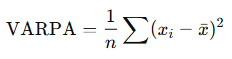
Where:
- xˉ is the population mean, calculated by AVERAGE(value1; value2; …)
- n is the number of values in the population
Like VARA(), the VARPA() function treats text and logical values as follows:
- Text entries and the logical value FALSE are treated as 0
- TRUE is treated as 1
Example
The same scenario used for the VARA() function also applies here. The software company experienced several website issues over the observed period:
- In May 2007 and August 2007, the website was unavailable due to hosting problems. These months are marked with the text « hostingproblems ».
- In March 2008, the product section was updated, preventing external access. This month is marked with the logical value FALSE.
As shown in Figure below, the result of the VARPA() function differs from that of VAR.P() because VARPA() includes text and logical values in the calculation.
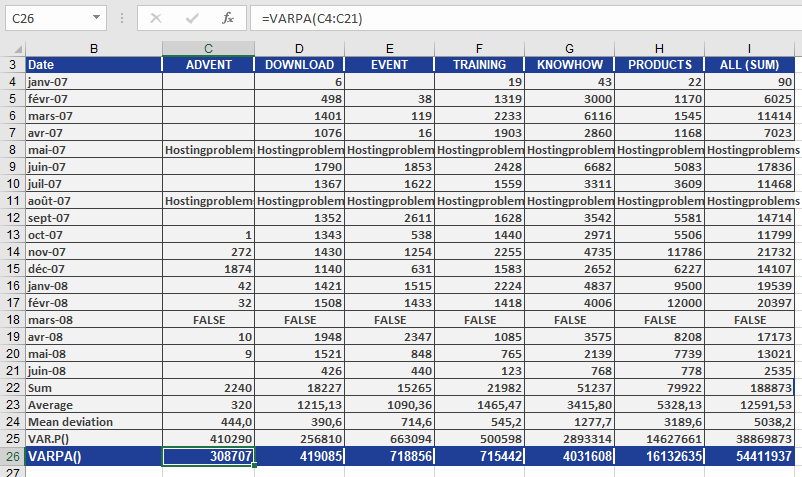
In this case, the text and the logical value FALSE are treated as 0, which affects the variance.
Looking at the DOWNLOAD section, the result can be summarized as follows:
The average squared deviation from the arithmetic mean—based on the population and including text and logical values—is 419,085 for the DOWNLOAD area.