
The VLOOKUP function (where « V » stands for Vertical) is used to quickly search for a specific value in the first column of a table or dataset and retrieve corresponding data from another column in the same row.
The syntax for the VLOOKUP function is as follows:
=VLOOKUP(lookup_value; table_array; col_index_num; [range_lookup])
Arguments:
- lookup_value (Required): The value to search for in the first column of the table.
- table_array (Required): The range of cells containing the data to be searched.
- col_index_num (Required): The column number (within the table array) from which to return the matching value.
- range_lookup (Optional): Specifies whether to find an exact match (FALSE) or an approximate match (TRUE).
- If TRUE (or omitted), it finds the closest match (or next largest value if no exact match exists).
- If FALSE, it returns an exact match or #N/A if no match is found.
USING THE VLOOKUP FUNCTION
Consider the following example table containing 4 fruits and their prices. We will use VLOOKUP to find the price of Yam.
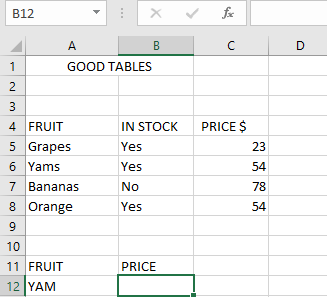
Steps to Find the Price of Yam:
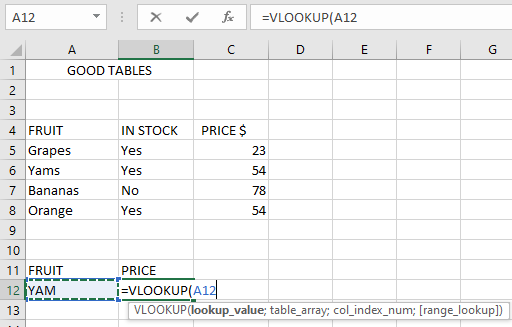
- Select an empty cell and begin the VLOOKUP function with the lookup_value (e.g., cell A12 containing « Yam »):
=VLOOKUP(A12;
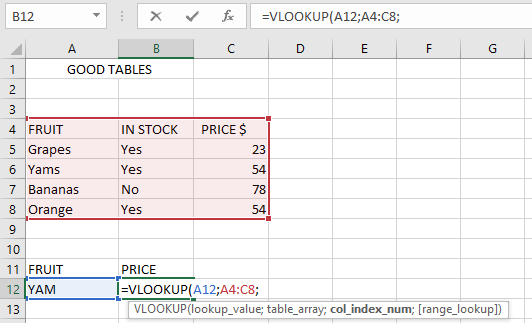
- Define the table_array (the range where data is stored, e.g., A4:C8):
=VLOOKUP(A12; A4:C8,
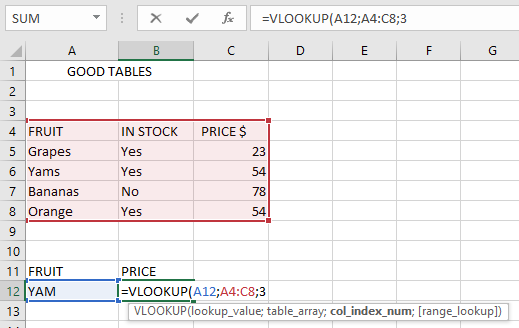
- Specify the col_index_num (the column containing the return value, e.g., 3 for « Price »):
=VLOOKUP(A12; A4:C8; 3
- Choose between exact or approximate match (use FALSE for exact, TRUE for approximate):
=VLOOKUP(A12; A4:C8; 3; FALSE)
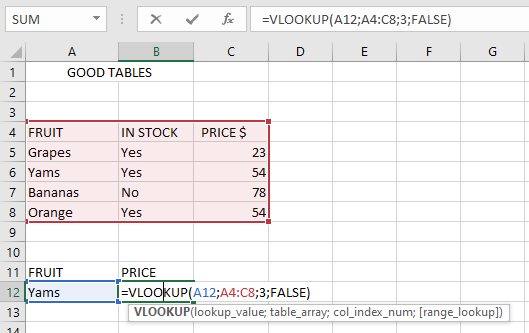
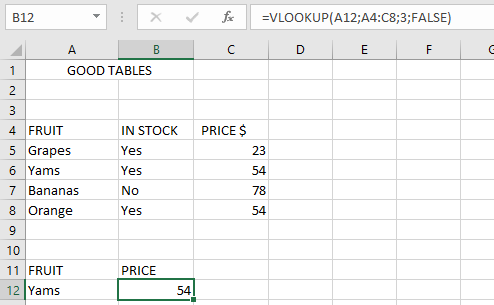
- Press Enter, and the result should be 54 (the price of Yam).
NOTES WHEN USING THE VLOOKUP FUNCTION
- If range_lookup is omitted, VLOOKUP defaults to TRUE (approximate match).
- If duplicate values exist, VLOOKUP returns only the first match.
- VLOOKUP is not case-sensitive (treats « APPLE » and « apple » the same).
- Wildcards (*, ?, ~) can be used for partial matches.
Common Errors:
- #N/A! → No match found for the lookup value.
- #VALUE! → Occurs if:
- col_index_num is less than 1 or non-numeric.
- range_lookup is not TRUE/FALSE.
- #REF! → Happens when:
- col_index_num exceeds the table’s column count.
- A referenced cell in the formula does not exist.