Finance

Charts

Statistics

Macros

Search

Information Icon in Excel VBA

The example demonstrates a message box displaying the information icon.

Sub MsgBoxInformation()
    MsgBox "This is an information message", vbInformation, "Info"
End Sub
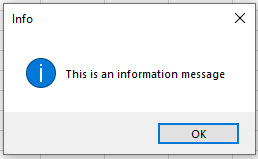
Explanation:
An icon (in this case, the letter “i” for “Information”) can be displayed on its own. In this scenario, a simple message box with only the OK button is shown.

0 0 votes
Évaluation de l'article
S’abonner
Notification pour
guest
0 Commentaires
Le plus ancien
Le plus récent Le plus populaire
Online comments
Show all comments
Facebook
Twitter
LinkedIn
WhatsApp
Email
Print
0
We’d love to hear your thoughts — please leave a commentx