
The AddLine() method creates a line shape. The return value is an object of type Shape. For a line, the Line property of the Shape object controls the properties of the line itself. For larger shapes (such as rectangles), this property controls the border line characteristics.
Data arrays can contain not only variables but also references to objects. In this example, an array of references to three similar line shapes is created:
Sub CreateLines()
    Dim Sh(1 To 3) As Shape
    Dim i As Integer
    ThisWorkbook.Worksheets("Sheet3").Activate
    For i = 1 To 3
        Set Sh(i) = ActiveSheet.Shapes.AddLine(240, 30, 280, 30)
        Sh(i).Line.ForeColor.RGB = RGB(255, 0, 0)
        Sh(i).Line.Weight = 3
        Sh(i).Rotation = (i - 1) * 30
        Set Sh(i) = Nothing
    Next i
End Sub
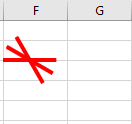
Explanation:
The AddLine() method requires four parameters:
- BeginX and BeginY specify the coordinates of the line’s starting point.
- EndX and EndY specify the coordinates of the line’s ending point.
Inside the loop, the color and thickness of each line are set uniformly.
The Rotation property is set differently for each line, increasing in increments of 30 degrees for each successive line.