
The following procedure demonstrates how to move the contents of one cell range and copy the contents of another, all within a selected worksheet.
VBA Example: Moving and Copying Cells
Sub MoveAndCopyCellContents()
    ThisWorkbook.Worksheets("Sheet1").Activate
    ' Move contents from A1:A2 to C1:C2
    Range("A1:A2").Cut Destination:=Range("C1")
    ' Copy contents from A5:A6 to C5:C6
    Range("A5:A6").Copy Destination:=Range("C5")
End Sub
Explanation of the Procedure:
- Activating the Worksheet:
The worksheet named « Sheet1 » is activated to ensure all operations are performed on the correct sheet. - Moving Cells Using .Cut:
- Range(« A1:A2 »).Cut Destination:=Range(« C1 »)
-
- This line uses the .Cut method to cut (i.e., remove and transfer) the contents from cells A1 to A2.
- The optional Destination parameter specifies the target range starting at C1.
- The result is that the contents of A1 and A2 are moved to C1 and C2 respectively.
- If Destination is not specified, the content is placed in the clipboard, and must then be manually pasted elsewhere.
Copying Cells Using .Copy:
Range(« A5:A6 »).Copy Destination:=Range(« C5 »)
-
- This line uses the .Copy method to duplicate the contents from A5:A6 into C5:C6.
- As with .Cut, if the destination is not provided, the copied content will be sent to the clipboard for manual pasting.
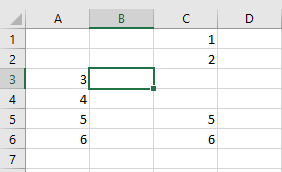
Visual Outcome:
- Before Running the Procedure:
The data resides in its original positions: A1:A2 and A5:A6.

- After Running the Procedure:
- The values from A1:A2 are moved to C1:C2, leaving A1:A2 empty.
- The values from A5:A6 are copied to C5:C6, so both A5:A6 and C5:C6 now contain the same content.
Why Use This Approach?
Compared to older, more verbose methods involving selection and manual pasting, the .Cut and .Copy methods with the Destination parameter:
- Use fewer lines of code
- Avoid unnecessary selection operations (which can slow down execution)
- Are cleaner and easier to maintain
- Improve code performance and clarity