
When working with optional parameters, it’s important to understand named parameters as well. You can pass arguments to object methods or your own procedures in three ways:
- Passing all parameters in the correct order.
- Passing only the first few parameters, also in correct order.
- Passing only the desired parameters by name, in any order.
This section shows how to write your own procedures that accept named parameters.
Advantages of Named Parameters
- You can clearly specify which parameter you are assigning a value to.
- You do not have to specify all possible parameters.
- Your code becomes more readable.
Example:
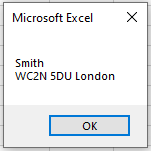
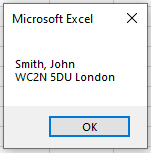
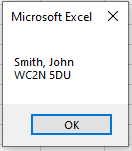
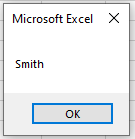
The procedure Address() is called five times with different parameter combinations. It concatenates and displays a formatted address string based on the parameters received.
Sub NamedParameters()
    Address "Smith", City:="London"
    Address "Smith", City:="London", ZIP:="WC2N 5DU"
    Address "Smith", FirstName:="John", City:="London", ZIP:="WC2N 5DU"
    Address Name:="Smith", ZIP:="WC2N 5DU", FirstName:="John"
    Address "Smith"
End Sub
Sub Address(Name As String, Optional FirstName As String, _
Optional ZIP As String, Optional City As String)
    Dim Output As String
    If FirstName <> "" Then
        Output = Name & ", " & FirstName
    Else
        Output = Name
    End If
    If ZIP <> "" Then
        If City <> "" Then
            Output = Output & vbCrLf & ZIP & " " & City
        Else
            Output = Output & vbCrLf & ZIP
        End If
    Else
        If City <> "" Then
            Output = Output & vbCrLf & City
        End If
    End If
    MsgBox Output
End Sub

Explanation:
The Address() procedure expects four string parameters: Name (required), and optional FirstName, ZIP, and City.
The optional parameters can be passed by name using the syntax ParameterName:=Value, which allows you to pass them in any order.
The procedure checks each parameter. If a parameter is not provided or is empty, it simply omits that part from the output.
The fourth call demonstrates that even the required parameter Name can be passed by name, improving readability and clarity.
This flexibility is useful when working with procedures that have many optional parameters, as it makes the calls easier to read and maintain.