
There are parallels between the hierarchical object models of Word and Excel:
- The main object, Application, represents the Word application itself.
- Using the CreateObject() function, ActiveX objects can be created. To access Word, an object of type Word.Application is created and a reference to this object is returned. This reference is used throughout the program to interact with the Word application. At the end, the Word application must be properly closed.
- A property of the Application object is the Documents collection, which contains all the Word documents currently open or accessible.
- A property of an individual document is the Paragraphs collection, which contains all paragraphs within that document.
- Similarly, the Tables collection contains all tables within a single document.
- A property of an individual table is the Cells collection, which contains all the cells of that table. A single cell can be accessed, similarly to Excel, via the Cells collection.
- The term Range in Word also refers to a range of content. This range can include one or more paragraphs, either completely or partially, and can also encompass table cells.
To access the Word object model from Excel’s Visual Basic Editor (VBE), a reference to the Microsoft Word Object Library must first be set up. This is done via the menu Tools → References by selecting the appropriate version of the Microsoft Word Object Library, as shown in Figure.
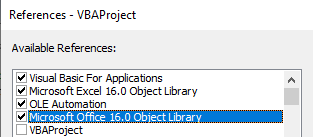
- For Word 2019 and Word 2016, this is the Microsoft Word 16.0 Object Library.
- For Word 2013, it is the Microsoft Word 15.0 Object Library.
- For Word 2010, it is the Microsoft Word 14.0 Object Library.
- For Word 2007, it is the Microsoft Word 12.0 Object Library.