
The following VBA procedure demonstrates how to open an existing Excel workbook:
Sub OpenExistingWorkbook()
    Workbooks.Open "C:\Users\MAC 2015\Desktop\exercice.xlsm"
End Sub
Explanation:
This procedure uses the Open() method of the Workbooks object. When Workbooks.Open is called with a file path as an argument, Excel opens the specified workbook file from the given location.
Once opened, the workbook becomes the active workbook, meaning it is now in focus and ready for user input or further processing through code.
By opening this file, a new item is also added to the Workbooks collection, increasing the count of open workbooks.
In the example shown above, an absolute file path (C:\Users\MAC 2015\Desktop\exercice.xlsm) is used to specify the workbook location. However, you can also open files using relative paths or paths pointing to the same directory as the workbook executing the code.
Important Note:
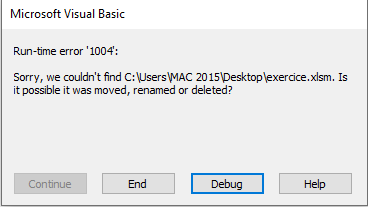
If the specified file does not exist at the given location, the program will fail and throw a runtime error. Excel displays an error message and halts execution, as illustrated in Figure 2.2.
These types of runtime interruptions are common when dealing with file operations. In Chapter 4, « Error Handling », you will learn how to catch and handle such errors properly, so your VBA code can respond gracefully instead of crashing.