
The type of calculation performed with the elements of a formula is defined by the operator used. VBA has four categories of operators:
■ Arithmetic operators
■ Comparison operators
■ Logical operators
■ Concatenation operators
Arithmetic Operators
Arithmetic operators, described and illustrated in the table below, are used to perform mathematical calculations:
| Operator | Description | Example |
|---|---|---|
| + | Adds two values. | 7 + 7 results in 14. |
| – | Subtracts two values. | 7 – 2 results in 5. |
| * | Multiplies two values. | 3 * 3 results in 9. |
| / | Divides two values. | 8 / 2 results in 4. |
| \ | Returns the integer portion of a division. | 17 \ 2 results in 8. |
| Mod | Returns the remainder of a division. Non-integer values used in the division are rounded. | 17 Mod 2 results in 1. 19 Mod 4 results in 3. 19 Mod 4.2 results in 3. |
| ^ | Calculates exponentiation. | 3 ^ 3 results in 27. |
Comparison Operators
Comparison operators, described and illustrated in the table below, allow you to compare the values of two expressions, returning a result of True (for true comparisons), False (for false comparisons), or Null (if one of the expressions in the comparison contains invalid data):
| Operator | Description | Examples |
|---|---|---|
| = | Equal to. | 20 = 15 + 15 results in False. |
| <> | Not equal to. | 25 <> 20 + 20 results in True. |
| > | Greater than. | 50 > 70 – 25 results in True. |
| < | Less than. | 20 < 10 + 10 results in False. |
| >= | Greater than or equal to. | 50 >= 10 * 7 results in False. |
| <= | Less than or equal to. | 30 <= 15 + 15 results in True. |
| Is | Compares two object reference variables. | Object Is Var returns True, assuming Object equals X and X equals Var. |
| Like | Compares two strings. | « FnnnF » Like « F*F » returns True. |
Logical Operators
Logical operators, like comparison operators, return a result of True, False, or Null. The table below describes these operators:
| Operator | Description | Examples |
|---|---|---|
| And | Adds conditions to a logical test. Returns True if all conditions are true, False if any are false, and Null if one is null. | 12 > 5 And 8 < 7 results in False. 12 > 5 And 8 > 7 results in True. |
| Or | Adds conditions like And, but returns True if at least one condition is true, False if all are false, and Null if one is null. | 12 > 5 Or 8 < 7 results in True. |
| Not | Reverses the logic of an expression, creating a logical negation. | Not 12 > 5 results in False. |
| Eqv | Tests for logical equivalence and returns True if both expressions are either true or false, False or Null otherwise. | 12 > 5 Eqv 8 > 5 results in True. 12 < 5 Eqv 8 < 5 results in True. |
| Xor | Performs logical exclusion, returning True if one expression is true and the other is false. If both are true or both are false, returns False. If one expression is null, returns Null. | 9 > 7 Xor 7 < 5 results in True. 9 > 7 Xor 7 > 5 results in False. |
Concatenation Operators
The VBA concatenation operator is &. Concatenation is used to create a single text string by combining two or more text strings. For example:
Sub ConcatenationOperator()
    MsgBox ("Welcome" & " Elie Chancelin")
End Sub
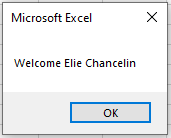
We can say that the concatenation operator is also used to join separate values, such as a text string with the system-defined date, or even to display in a single message box a string that includes the value of a variable.
NOTE
String concatenation can also be represented by a plus sign (+). However, many programmers prefer to limit the plus sign to numeric operations to avoid ambiguity.
Order of Operations
The order in which operations are performed in VBA is the same as in Excel: first, all exponentiations are executed, then multiplications and divisions, and finally additions and subtractions. Any operation within parentheses is resolved before anything else. For example, the expression 5 + 3 * 2 equals 11, while the expression (5 + 3) * 2 equals 16.