
Some key elements of the hierarchical Outlook object model include:
- The main object Application represents the Outlook application.
- Similar to Word, an object of type Outlook.Application is created using the CreateObject() function to access Outlook, and a reference to this object is returned. This reference is then used throughout the code to interact with the Outlook application. The Outlook application must be properly closed at the end.
- The CreateItem() method of the Application object is used to create items such as emails, contacts, or appointments. Depending on the item type, different properties and methods are available.
- The GetNameSpace() method of the Application object returns a namespace object, which is needed to access Outlook folders. The only supported namespace type is MAPI.
- The GetDefaultFolder() method of the MAPI namespace returns a Folder object representing the default folder of a specific type, such as Inbox (olFolderInbox) or Contacts (olFolderContacts).
- The Items property is a collection of items within an Outlook folder. Depending on the type of item, different properties and methods are available.
To access the Outlook object model from Excel’s Visual Basic Editor (VBE), you must first set a reference to the Microsoft Outlook Object Library. This is done via the menu Tools → References by selecting the appropriate version of the Microsoft Outlook Object Library, as shown in next Figure.
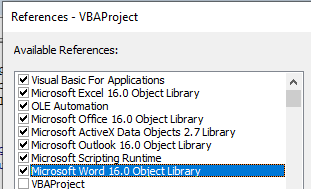
- For Outlook 2019 and Outlook 2016, this is the Microsoft Outlook 16.0 Object Library.
- For Outlook 2013, it is the Microsoft Outlook 15.0 Object Library.
- For Outlook 2010, it is the Microsoft Outlook 14.0 Object Library.
- For Outlook 2007, it is the Microsoft Outlook 12.0 Object Library.