
The type msoShapeOval is used to create an oval shape. If the width and height are equal, the shape becomes a perfect circle. Many graphic objects can contain text, which is demonstrated here with the oval:
Sub CreateOval()
    Dim Sh As Shape
    ThisWorkbook.Worksheets("Sheet3").Activate
    Set Sh = ActiveSheet.Shapes.AddShape(msoShapeOval, 130, 30, 80, 50)
    Sh.Fill.ForeColor.RGB = RGB(91, 155, 213)
    Sh.Line.DashStyle = msoLineDash
    Sh.TextFrame.Characters.Text = "Hello"
    Sh.TextFrame.Characters.Font.Color = vbYellow
    Set Sh = Nothing
End Sub
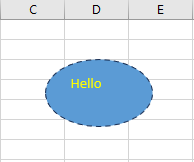
Explanation:
By specifying the type msoShapeOval, you create an oval.
The DashStyle property of the shape’s line controls the style of the border line. The values come from the enumeration msoLineDashStyle. Here, msoLineDash means the line is dashed.
The TextFrame property allows you to set certain text-related properties for many shapes (though not all). Related properties include TextFrame2 and TextEffect.
The sub-property TextFrame.Characters is used to assign the actual text (via the Text property) and to set font attributes (via the Font property).