The AVERAGE function in Excel calculates the average (arithmetic mean) of a group of numbers. The AVERAGE function ignores logical values, empty cells, and text values.
Syntax:
=AVERAGE(number1, [number2], …)
Where:
■ number1 (required argument) – The first reference or range of items or cells for which you want to calculate the average.
■ number2… (optional argument) – You can add up to 255 additional items, cell references, or ranges in which to calculate the average.
You can use ranges or cell references instead of explicit values. The AVERAGE function can handle up to 255 arguments, each of which may be a value, a cell reference, or a range.
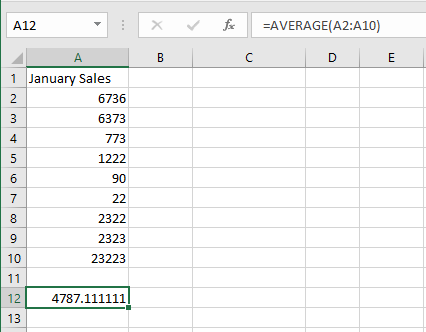
This example calculates the average of January sales using the AVERAGE function, which returns the arithmetic mean of the arguments.
=AVERAGE(number1, number2, …)
NOTE:
To determine the last filled column in a worksheet, use the formula =COUNTA(1:1), as shown in cell B2.
number1, number2, …: From 1 to 30 numeric arguments for which you want to calculate the average.
You may also use a cell reference, as demonstrated in this example.
To calculate the average January sales:
- In cell A12, enter the following formula:
=AVERAGE(A2:A10) - Press Enter.