
The worksheet function IsFormula() has been available since Excel 2013. It determines whether a cell contains a formula. If this is the case, the formula of the cell can be retrieved and displayed using the various versions of the Formula property.
Below is an example where the range from A10 to A14 is checked for formulas. The formulas in cells A13 and A14 are displayed in all four property versions.
Sub FormulaVersions()
    ThisWorkbook.Worksheets("Sheet1").Activate
    Range("A13").Formula = "=A10 + A11 + A12"
    Range("A14").Formula = "=SUM(A10:A12)"
    Range("A15").FormulaLocal = "=A10 + A11 + A12"
    Range("A16").FormulaLocal = "=SUM(A10:A12)"
    Range("A17").FormulaR1C1 = "=R[-7]C + R[-6]C + R[-5]C"
    Range("A18").FormulaR1C1 = "=SUM(R[-8]C:R[-6]C)"
    Range("A19").FormulaR1C1Local = "=R[-9]C + R[-8]C + R[-7]C"
    Range("A20").FormulaR1C1Local = "=SUM(R[-10]C:R[-8]C)"
End Sub

Sub DisplayFormulas()
    Dim i As Integer
    ThisWorkbook.Worksheets("Sheet1").Activate
    For i = 10 To 14
        If WorksheetFunction.IsFormula(Cells(i, 1)) Then
            MsgBox Cells(i, 1).Address & vbCrLf & _
                   Cells(i, 1).Formula & vbCrLf & _
                   Cells(i, 1).FormulaLocal & vbCrLf & _
                   Cells(i, 1).FormulaR1C1 & vbCrLf & _
                   Cells(i, 1).FormulaR1C1Local & vbCrLf
        End If
    Next i
End Sub
Figures:
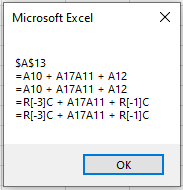
Addition formula in cell A13 – shown in four versions
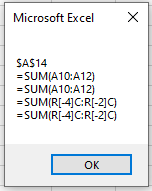
Sum formula in cell A14 – shown in four versions
Notes:
For versions of Excel prior to 2013, the loop index i should run only from 13 to 14 because IsFormula() is not available. Additionally, the condition using IsFormula() should be omitted.
Sometimes you will see the notation Application.WorksheetFunction.IsFormula() used as well. However, the top-level object name Application can usually be omitted.