
The RefEdit control is used to allow the user to select a cell range from a worksheet. It works similarly to the Application.InputBox() function with the Type parameter set to request a range, but unlike the InputBox, RefEdit is embedded in a UserForm and combined with other controls.
Cell ranges can be entered either by typing directly into the RefEdit box or by selecting the range with the mouse.
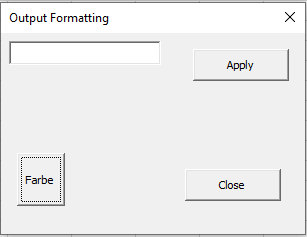
Mouse selection is only possible if the cursor is first inside the RefEdit control, as shown in Figure 10.20. After clicking on the worksheet to select a range, the entire dialog box shrinks so that only the RefEdit control remains visible, as illustrated in Figure.

A toggle button is used to switch between or display two possible states. Its most important property is Value, which can be either True or False.
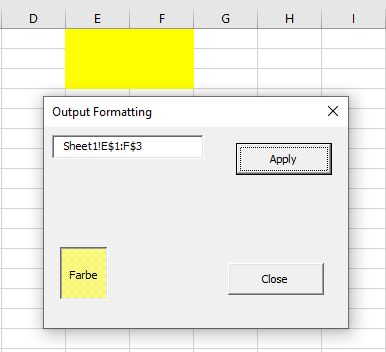
In the following example from the UserForm module frmRefEdit, both controls are used to either highlight or clear the fill color of the selected cell range, as shown in Figure.
Program code:
Private Sub tglFarbe_Click()
    If tglFarbe.Value Then
        tglFarbe.BackColor = vbYellow
    Else
        tglFarbe.BackColor = vbWhite
    End If
End Sub
Private Sub cmdUebertragen_Click()
    On Error GoTo Fehler
    If tglFarbe.Value Then
        Range(rfeZellbereich.Value).Interior.Color = vbYellow
    Else
        Range(rfeZellbereich.Value).Interior.Pattern = xlNone
    End If
    Exit Sub
Fehler:
    MsgBox "No range was selected"
End Sub
Private Sub cmdEnde_Click()
    Unload Me
End Sub
Explanation:
- Clicking the toggle button switches its Value property between True and False. To make the state visually clearer, the toggle button’s background color also changes accordingly: yellow when active (pressed) and white when inactive.
- Clicking the TRANSFER command button applies the yellow fill color to the selected cell range if the toggle button is on, or clears the fill pattern if it is off.
- Since the user can enter text that does not represent a valid cell range into the RefEdit control, error handling with On Error is used to catch such cases and display a message box informing the user that no valid range was selected.